How to set up your Google Business Profile (Step-by-Step Guide)

If you have ever searched "coffee shop near me" or "best yoga studio in [your city]," you have seen a Google Business Profile in action. It is the listing that shows up on Google Maps and in search results with photos, reviews, hours, and quick links to a website.
The best part is that setting up your own Google Business Profile costs nothing, and it can quickly become one of the most powerful marketing tools a small business uses.
A Google Business Profile is a free listing that controls how a business appears on Google Maps and Search. To set one up, sign in with a Google account, add the business name, category, and location or service area, verify the business, then complete the profile with hours, photos, services, and a description. Keeping it updated and collecting reviews turns searches into customers.
What we'll explore
- What is a Google Business Profile?
- Why does a Google Business Profile matter for small businesses?
- How do I set up a Google Business Profile step by step?
- How do I optimize my Google Business Profile?
- How do I get reviews and respond to them?
- How do I keep my profile working for me?
- What Google Business Profile mistakes should I avoid?
What is a Google Business Profile?
A Google Business Profile (formerly known as Google My Business) is a free tool that helps you control how your business appears across Google, in Maps, Search, and those high-intent "near me" searches.
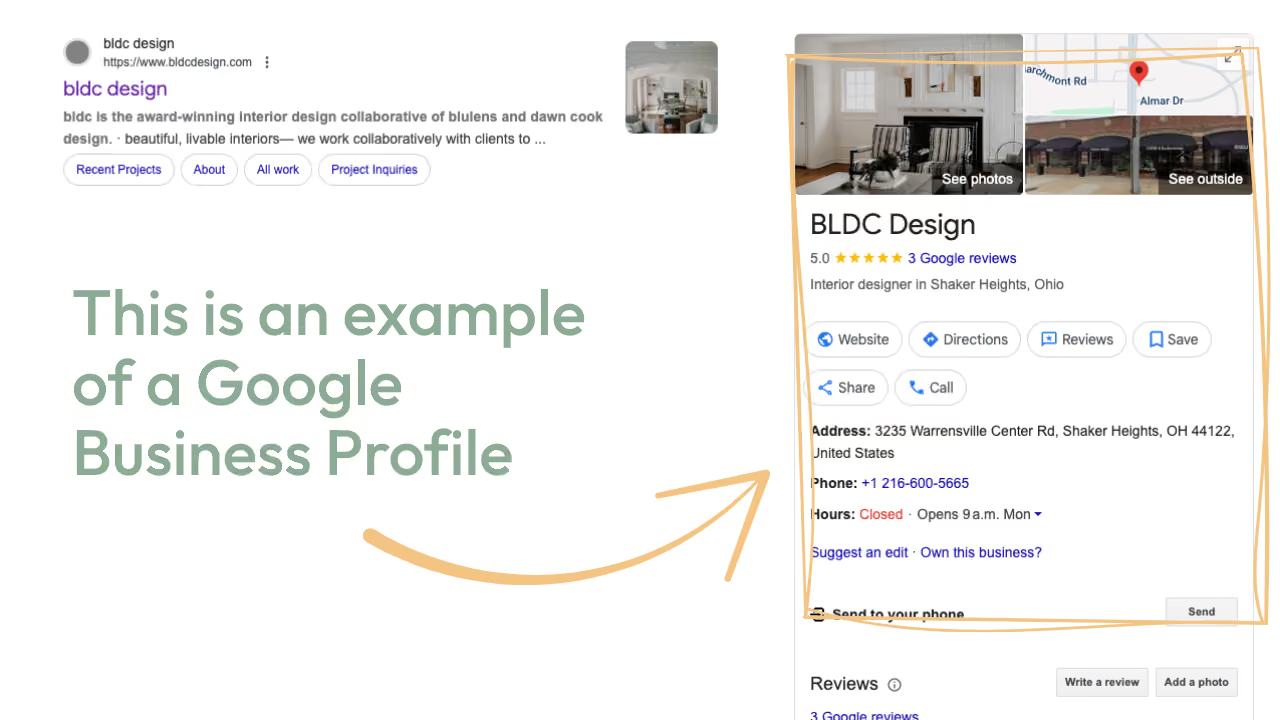
Think of it as your digital storefront. It is often the very first impression a customer has of you, which makes it one of the most important pieces of your online presence. A complete profile shows a business name, a short description, photos, reviews, opening hours, a phone number, and a link to your website, all in one place.
When optimized, your profile can:
- Put your business on Google Maps so nearby customers can easily find you.
- Help you appear in "near me" searches when people are ready to buy.
- Showcase reviews that build trust and influence decisions.
- Generate leads without ads or endless posting on other platforms.
Do I need a physical storefront? A storefront is not required to benefit. Consultants, coaches, service-based businesses, and online shops can all use a Google Business Profile to increase visibility and credibility. Businesses that travel to customers can list the areas they serve instead of showing a street address, and Google has its own rules about who is eligible, so it is worth reading them during setup.
Why does a Google Business Profile matter for small businesses?
Most businesses do not miss opportunities because they are not capable. They miss them because their marketing feels scattered, with too many platforms, too many decisions, and not enough time. A Google Business Profile is one of the few tools that sits right where customers are already looking.
Your Google Business Profile helps you:
- Be visible when customers are actively searching. Someone typing "physiotherapist near me" is usually ready to book, and a profile puts your name in front of them at that moment.
- Build trust by showing consistent information and collecting reviews. Photos, hours, and reviews answer a customer's first questions before they ever contact you.
- Save money by creating a presence that works without ad spend. A free, well-kept profile keeps working in the background all day.
- Stay connected by sharing updates, offers, or events directly on your profile. Customers who find you through Google can see what is new.
It is one of the simplest, highest-impact moves you can make in your marketing, and it pairs well with a website, an email list, and a steady habit of asking for reviews.
How do I set up a Google Business Profile step by step?
Setup takes about twenty minutes for most businesses, and the screens guide you along the way. Google updates the exact wording from time to time, so follow the on-screen prompts if a button looks slightly different.
Step 1: Gather the basics
Have the business name, address or service area, phone number, website, and opening hours ready. A logo and a few photos make the profile feel complete from day one. Use the exact business name that appears on your sign, website, and invoices, since consistent information builds trust.
Step 2: Sign in and start your profile
Sign in with a Google account that you plan to keep long term, ideally one the business owns. Then go to the Google Business Profile page and choose the option to add or create your profile. Search for your business name first, in case a listing already exists that you can claim.
Step 3: Add your business name and category
Enter the name and choose the category that describes your main service. The category helps Google decide which searches to show you in, so pick the most specific option available, such as "yoga studio" instead of "fitness center."
Step 4: Add your location or service area
If customers visit you, add the street address. If you travel to customers, list the cities or neighborhoods you serve. Online businesses and home-based businesses can often hide their home address while still showing a service area.
Step 5: Add contact details and a website
Include a phone number and a website address, then double-check both. A single wrong digit sends customers to the wrong place, so test the link and call the number once it is live.
Step 6: Verify your business
Google asks you to confirm that the business is real. Depending on the business, verification can happen by phone, text, email, video, or a postcard mailed to the address, and the options shown to you may vary. A postcard can take several days, so start early if the business is about to open. A business with a website can also verify that site with Google Search Console, which may allow the profile to be verified instantly.
Step 7: Complete the profile
Once verified, add hours, a description, services, and photos, which the next section covers in detail. A profile that is fully filled out gives Google more information to match with searches and gives customers more reasons to choose you.
Setting up before you launch. A business that is still getting ready to open can often create a profile once it has a real name, a clear service, and a way to be verified. Starting early means the profile is already working, and the first reviews can arrive with the first customers.
How do I optimize my Google Business Profile?
Optimizing simply means filling in every part of the profile with clear, honest, useful details. These pieces make the biggest difference.
The business description. Write two or three plain sentences about what you do, who you help, and what makes you different. Use the words customers would type into Google, such as "beginner-friendly yoga classes in [your city]," and keep the tone natural rather than stuffed with keywords.
Categories. Choose one main category and add a few secondary ones that truly apply. A yoga studio might add "meditation center" or "wellness center," if that matches what is offered.
Services and products. List each service with a short description and, if comfortable, a starting price. Customers often decide based on whether they can quickly see what you offer.
Photos and video. Real photos outperform stock images because they show customers what to expect. Add a clear logo, a cover photo, pictures of your space, your team, and your work in action.
Hours, including holidays. Accurate hours prevent frustrated customers, and special hours for holidays show that the profile is looked after.
Business name. Use the real name of the business as it appears in the real world. Google can suspend profiles that add extra keywords or locations to the name.
A booking or contact link. If customers can book, order, or request a quote online, add that link so a search can turn into a customer in a single click.
How do I get reviews on my Google Business Profile, and how do I respond to them?
Reviews/testimonials are one of the strongest trust signals on a profile, and most arrive only when someone asks. Ask while the customer is happiest, which is usually right after a great experience, and make it easy by sharing the direct link to your review page from your profile.
A message that works well:
Hi [First Name], thank you for coming in. If you enjoyed your visit, would you mind leaving a short review? It helps other people in the area find us. Here is the link: [link]
A few habits keep reviews flowing:
- Ask every customer, not only the ones you expect to be thrilled.
- Add the link to follow-up emails, receipts, and your email signature.
- Gently invite specifics, such as what they liked most, since detailed reviews help future customers.
- Never offer payment for reviews, and avoid asking for only positive ones, since Google's rules discourage both.
How should I respond to reviews? Reply to every review, which shows that real people run the business. For a positive review, thank the customer by name and mention something specific. For a critical review, stay calm, thank them for the feedback, and offer to make it right by phone or email. Future customers read your replies as closely as the reviews themselves.
A simple reply to a positive review:
Thank you so much, [First Name]. It was a pleasure having you, and we are so glad you enjoyed the class. We would love to see you again soon.
How do I keep my Google Business Profile working for me?
Once you have created your profile, avoid the set-it-and-forget-it approach. A living, active profile will always perform better than one that looks abandoned. Here is how to keep it fresh:
- Upload recent photos of your work, products, or space.
- Post updates, treating the profile like a mini social feed where you can share events or offers.
- Ask happy customers for reviews, and respond to them.
- Double-check your business hours and links regularly to avoid out-of-date info.
Small updates signal to both Google and your customers that your business is active and trustworthy.
What does a simple routine look like? A short, regular habit works better than occasional big efforts.
- Weekly: Add one photo or post, and reply to any new reviews. This takes about five minutes.
- Monthly: Check hours, services, and links, and share a seasonal offer or event.
- Every quarter: Review the whole profile as if you were a new customer, and update the description, photos, and services as the business changes.
A helpful trick is to reuse what you already create. A photo from your social media, a tip from your newsletter, or a note about a new class can all become a profile update in seconds.
What does a Google Business Profile look like for a real business?
A small physiotherapy clinic had a website and a few loyal patients, but a nearly empty Google listing with an old phone number and two photos. New patients searching in the area rarely found it.
The owner spent one afternoon fixing the basics. She corrected the phone number and hours, chose more specific categories, wrote a short description, listed each treatment as a service, and added a dozen real photos of the clinic. Then she started sending a review link after each appointment.
Over the next few months, the clinic gathered a steady stream of reviews, and she spent about five minutes each week replying and adding a photo or update. More calls began to mention that people had found the clinic through Google, and the profile became one of the main ways new patients arrived, without any advertising.
The work was ordinary and the results came from keeping it up. A complete profile, a simple review habit, and a few minutes each week did the job.
What Google Business Profile mistakes should I avoid?
Leaving the profile unfinished. A profile with only a name and phone number gives customers little reason to choose you and gives Google little to match with searches.
Using inconsistent information. A business name, address, or phone number that differs from your website creates doubt. Keep every detail the same everywhere.
Ignoring reviews. Unanswered reviews, especially critical ones, suggest nobody is paying attention. A short, kind reply makes a difference.
Adding keywords to the business name. The name should match the real name of the business, and extra words can lead to a suspension.
Forgetting to update hours. Wrong holiday or seasonal hours send customers to a closed door and lead to unhappy reviews.
Using stock photos. Real photos build trust far better than generic images.
Setting it up once and never returning. A few minutes each week keeps the profile active and trustworthy.
Frequently asked questions about Google Business Profile
Is a Google Business Profile really free?
Yes. Creating and managing a profile costs nothing. Google may offer paid advertising options elsewhere, and none of them are required to have a profile.
How long does it take to verify my profile?
Some methods finish within minutes, while a mailed postcard can take several days. The options available depend on the business and Google's checks.
Can I have a profile without a storefront?
Yes. Businesses that travel to customers or work online can list a service area instead of a public street address, as long as they meet Google's eligibility rules.
How often should I update my profile?
A quick weekly check works well for most businesses. Add a photo or post, reply to reviews, and confirm that hours and links are correct.
What if my business already has a listing?
Search for the business name during setup, and Google will guide you through claiming the existing listing. Verification confirms that you are the rightful owner.
How long does it take to see results?
Improved visibility often builds over a few weeks to a few months, depending on competition and how complete the profile is. Reviews and regular updates tend to speed things up.
Do I need a website to use a Google Business Profile?
A website is not required, though adding one gives customers more information and gives Google more to connect with your profile. A single page with services, photos, and contact details is a strong start.
Where does a Google Business Profile fit in your marketing?
A Google Business Profile is one piece of your marketing puzzle. The harder part is knowing what to do next, which moves matter most, how to stay consistent, and how to market your business without burning out.
That is where Navia comes in. Navia is your marketing teammate. She shows you the daily moves that matter, gives you content written in your brand's voice, and helps you build consistency without second-guessing.
If creating your Google Business Profile feels like one win today, imagine stacking wins like this every week. That is what Navia helps you do.
For reference, you can create your profile here: Create My Google Business Profile