How to Plan for Black Friday as a Small Business

Black Friday has a reputation for being loud, rushed, and stressful. After more than fifteen years in marketing, I can tell you that the businesses that feel calm that week are the ones that did their thinking early. The sale itself is only one weekend, and the planning behind it is what decides how it goes.
Planning for Black Friday means choosing one clear goal, picking an offer that protects your profit, deciding exactly who you are speaking to, and building a simple timeline that runs from the first teaser through the thank-you. Once your emails and posts are written ahead of time and your website and inventory are ready, the week itself becomes a matter of following your plan.
In 2026, Black Friday lands on November 27 and Cyber Monday on November 30, which leaves enough time to do all of this well if you start now.
This guide walks through each step in order, and it shows how Navia builds the plan for you along the way.
What we'll explore
- Why planning ahead makes Black Friday easier and more profitable
- How to choose one clear goal for the season
- How to pick an offer that protects your profit
- How to decide who you are talking to and what they need to hear
- How to build a timeline from the first teaser to the thank-you
- What to get ready on your website, in your inventory, and in your schedule
- How to write your emails and posts before the rush begins
- How to plan Black Friday with Navia, step by step
- What to do if you are brand new or run a service business
- Common mistakes, plus answers to frequently asked questions
Why planning ahead changes how Black Friday feels
Most small business owners treat Black Friday as a single day to survive. They decide on a discount the week before, scramble to design a graphic the night before, and then spend the sale itself refreshing their inbox and hoping. By Cyber Monday they are exhausted, and the sale gets blamed for a result that was really about preparation.
Planning flips that experience. When the goal, the offer, the audience, and the dates are decided in advance, every task has a purpose and a place on the calendar. You are no longer making dozens of small decisions under pressure, because you already made them when you had time to think.
The other reason planning matters is timing. Shoppers begin thinking about gifts and deals well before the day itself, so the businesses that start talking early reach people while they are still deciding where to spend. A plan that begins three weeks out gives you room to build your email list, warm up your audience, and send your best offer to people who already trust you.
How Navia builds the plan with you
Navia is the affordable, reliable and trusted teammate who helps you get your marketing done with ease. She builds your whole Black Friday plan for you, so the busiest shopping weekend of the year feels exciting instead of overwhelming. She asks you a few short questions about what you sell, who it is for, and what you hope to achieve, then places a two-week plan of 14 tasks right on your calendar.
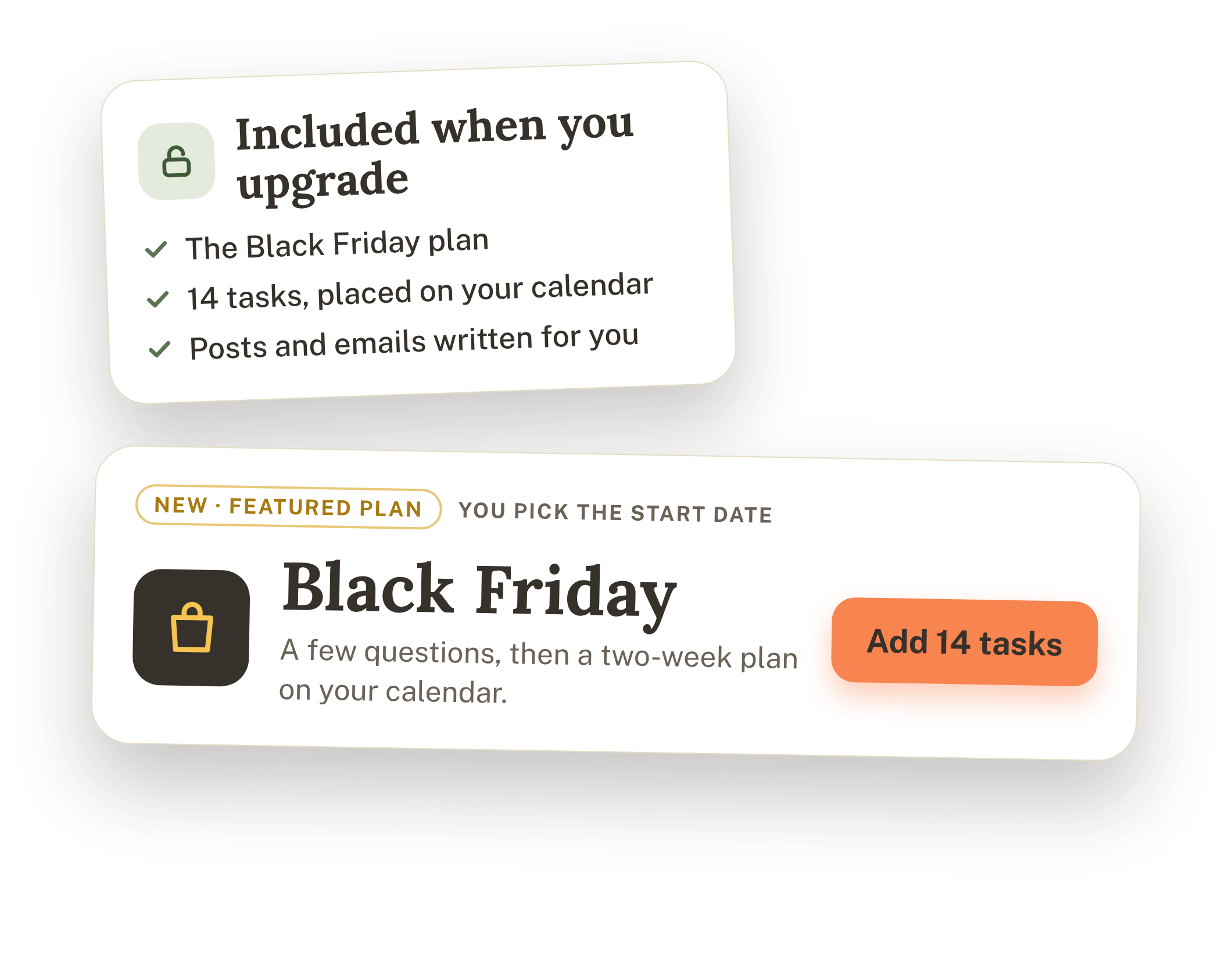
The Black Friday plan is included when you upgrade. To start it, open Navia, find the featured Black Friday plan, and choose to add it. From there she walks you through five short steps, and I will point out each one as we move through the planning below.
Start with one clear goal
Before anything else, decide what you want Black Friday to do for your business. This is the step most people skip, and it shapes every other choice. A sale built to bring in new customers looks very different from one built to thank loyal ones, and trying to do everything at once usually means doing none of it well.
Here are the goals I see working best, and what each one tends to ask of you:
- Make as many sales as possible. This calls for a strong offer, a clear deadline, and plenty of reminders to people who already know you.
- Bring in new customers. This calls for an offer that feels easy to try, plus content that introduces your business to people who have not met you yet.
- Get existing customers to buy again. This calls for early access, a thank-you feel, and personal emails to past buyers.
- Fill appointments or bookings. This calls for limited spots, clear dates, and an easy way to book.
- Grow your email list. This calls for a lead magnet and a sign-up page, so the sale gives you an audience that lasts past the weekend.
Pick the one that matters most right now, and write it down as a number with a date, such as "20 new customers before the end of December." A specific target gives you something to measure when the week is over, and it keeps you focused when a dozen other ideas try to pull you sideways.
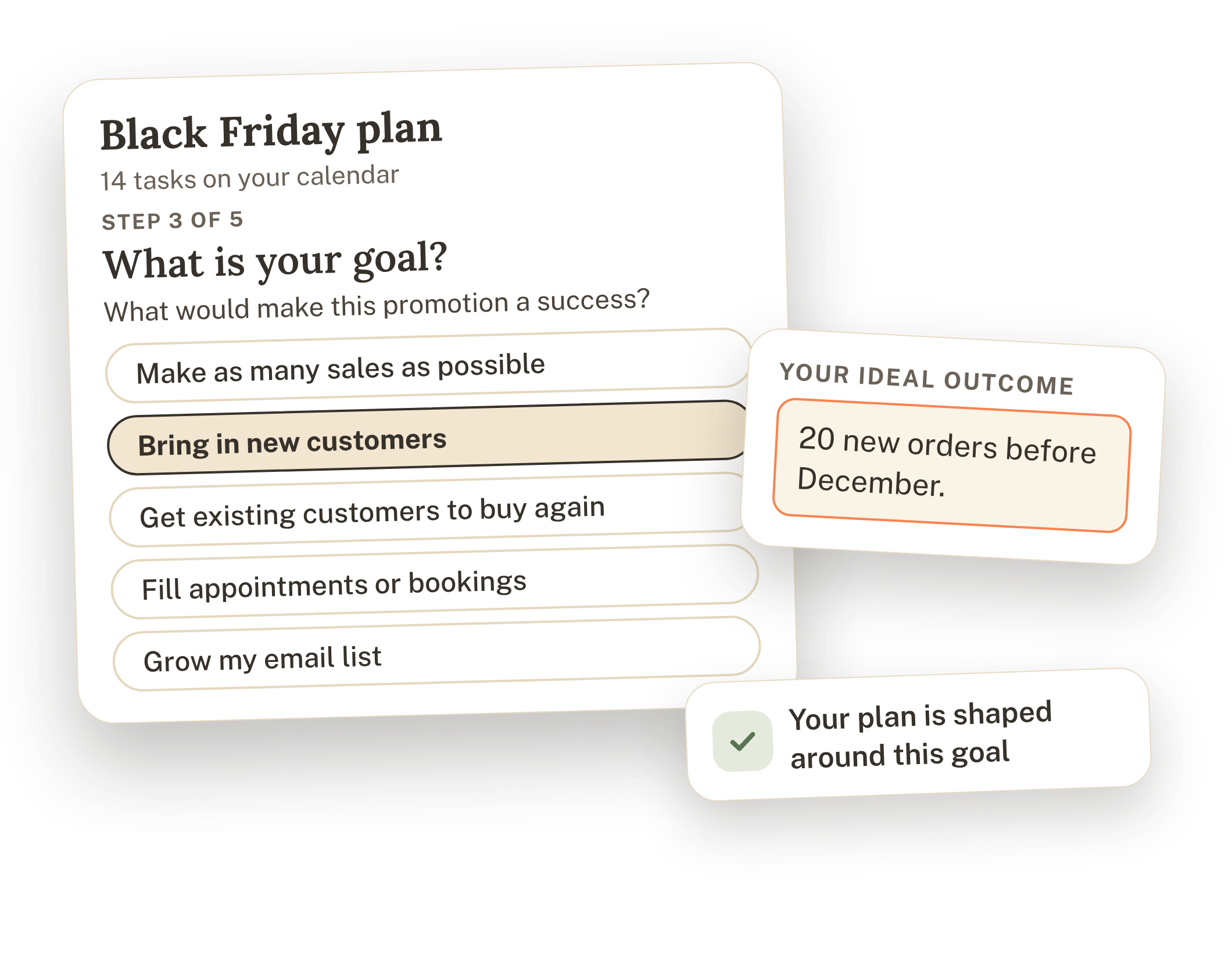
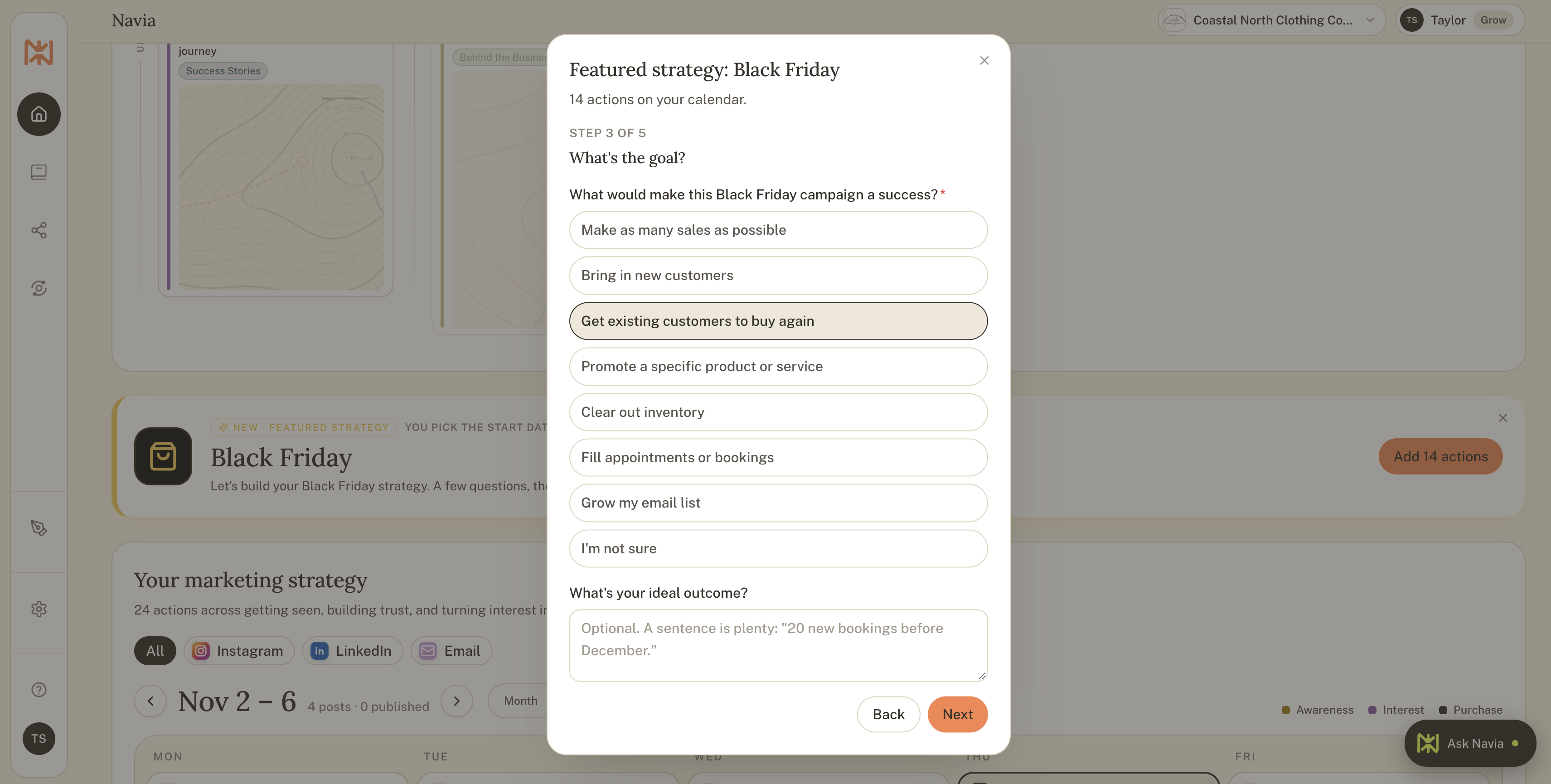
Doing this in Navia. After you add the Black Friday plan, Navia asks what would make this promotion a success. You choose from goals like making as many sales as possible, bringing in new customers, getting existing customers to buy again, filling appointments or bookings, and growing your email list. You can also describe the outcome you are dreaming of, and she shapes the whole plan around it.
Choose an offer that protects your profit
The biggest Black Friday regret I hear about is a discount that looked generous and turned out to cost too much. Choose your offer with a calculator in hand, since a sale that fills your calendar but leaves nothing in your bank account is not a win.
Start by working out what each product or service actually earns you. If you sell a $40 item and your costs for materials, packaging, shipping, and fees add up to $22, you earn $18 per sale. A 20 percent discount takes $8 off the price, which leaves $10, and now each sale earns about half of what it did before. That can still be worth it if the discount brings in plenty of new customers who will return, though it is better to know the number before you promise it.
There are many ways to make an offer attractive without cutting the price deeply:
- A percentage discount. Simple and familiar, so keep it modest and add an end date.
- A dollar amount off. Often feels bigger to shoppers than a small percentage on a lower-priced item.
- Buy one, get one. Works well when your costs on the second item are low.
- A bundle or package deal. Combine your favorites at a thoughtful price, which also raises your average order.
- A free gift with purchase. Adds value without lowering your prices.
- Free shipping. A strong motivator for online shoppers, as long as you build it into your costs.
If you prefer not to discount at all, you are in good company. Early access, a bonus, a limited edition, or a priority booking spot can make shoppers feel they got something special while your prices stay where they are.
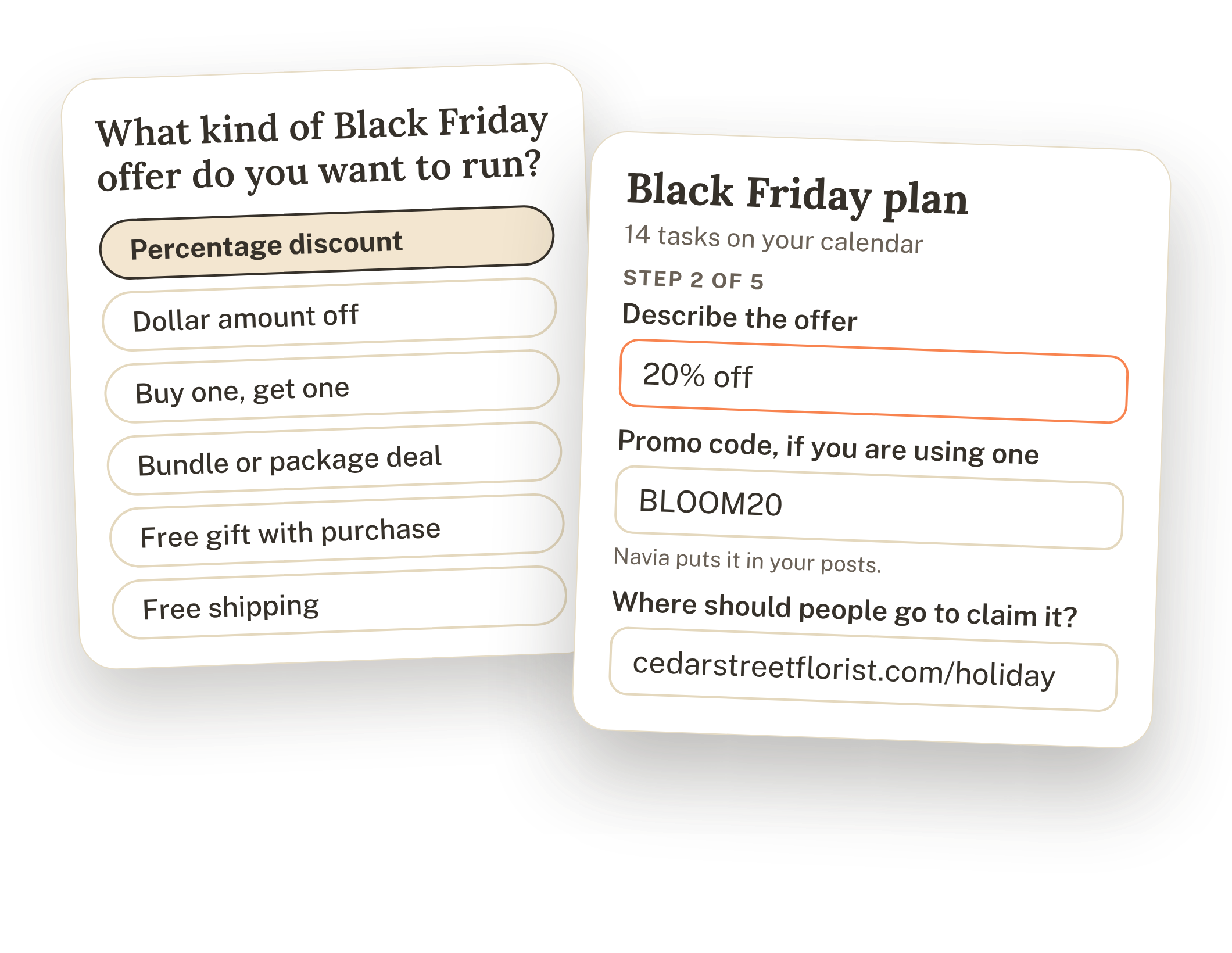
Doing this in Navia. Navia starts with the offers you already have. Your products and services come straight from your Brand Book, so everything you sell is already there, and you can add more at any time and choose what to feature. Then she asks what kind of Black Friday offer you want to run, such as a percentage discount, a dollar amount off, buy one get one, a bundle, a free gift, or free shipping. You add the details, including the offer itself, a promo code if you are using one, and where people should go to claim it. After that, she handles the rest.
Know exactly who you are talking to
A sale announcement written for everyone tends to land with no one. Take a few minutes to decide which groups of people this promotion is really for, because each group needs to hear something a little different.
For most small businesses, the audience falls into a handful of groups:
- Past customers. These are your warmest buyers, and they often respond to early access or a thank-you perk.
- Email subscribers and followers. They like your business already and may only need a reason and a deadline.
- Gift shoppers. They are buying for someone else, so they want ideas, guidance, and shipping dates.
- New people who have never heard of you. They need an easy introduction and a reason to trust you.
For each group, ask what they are hoping to find this season. A busy parent wants something quick and reliable, a gift shopper wants to feel confident they chose well, and a loyal customer wants to feel appreciated. Write one sentence for each group, and use those sentences to guide your subject lines, your photos, and your calls to action (and if you're not sure with how to find your audience, we've got you covered).
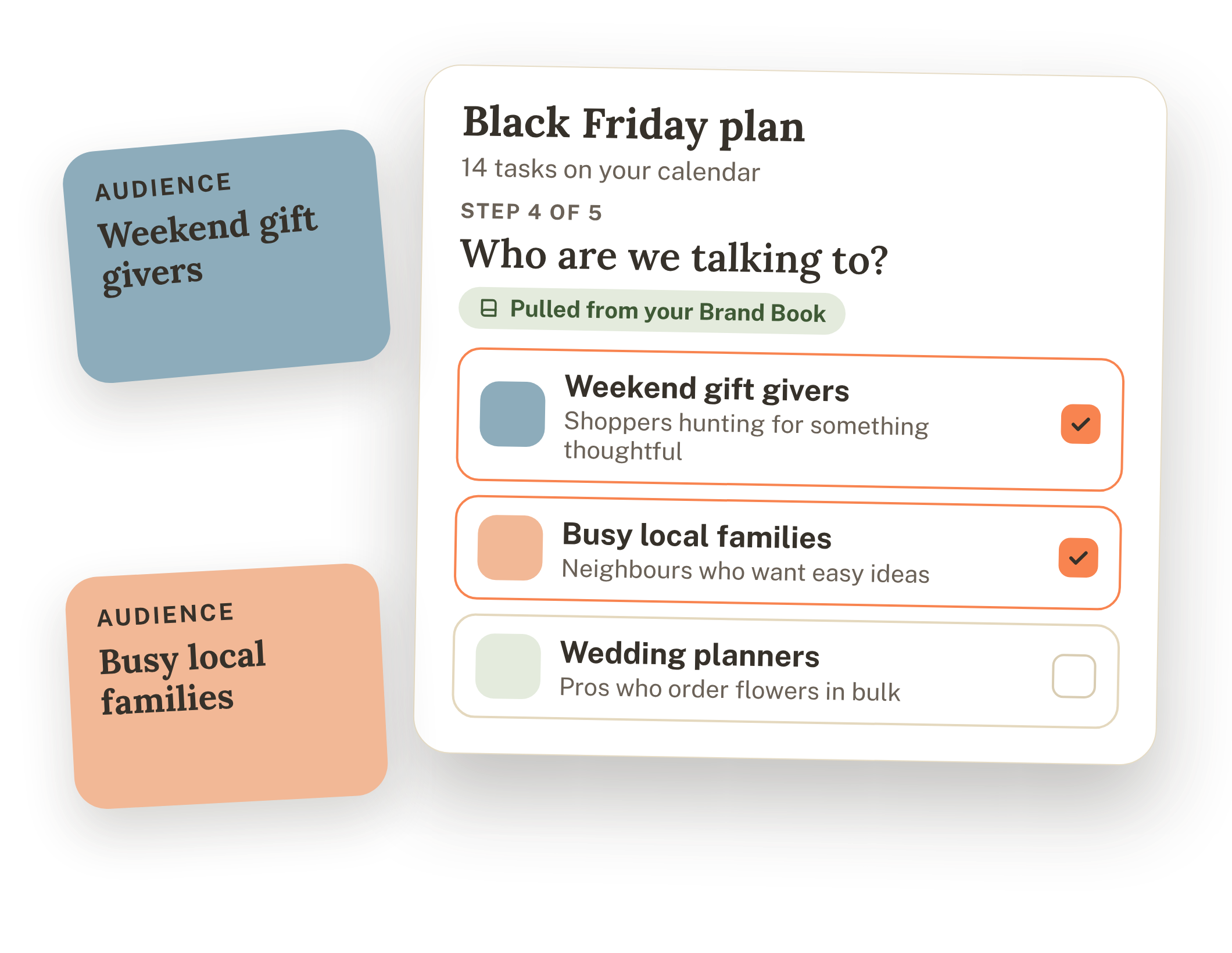
Doing this in Navia. Navia pulls your audiences straight from your Brand Book, so she already knows who you want to reach. You simply choose who this offer is for, such as weekend gift givers or busy local families, and she builds the messaging around them.
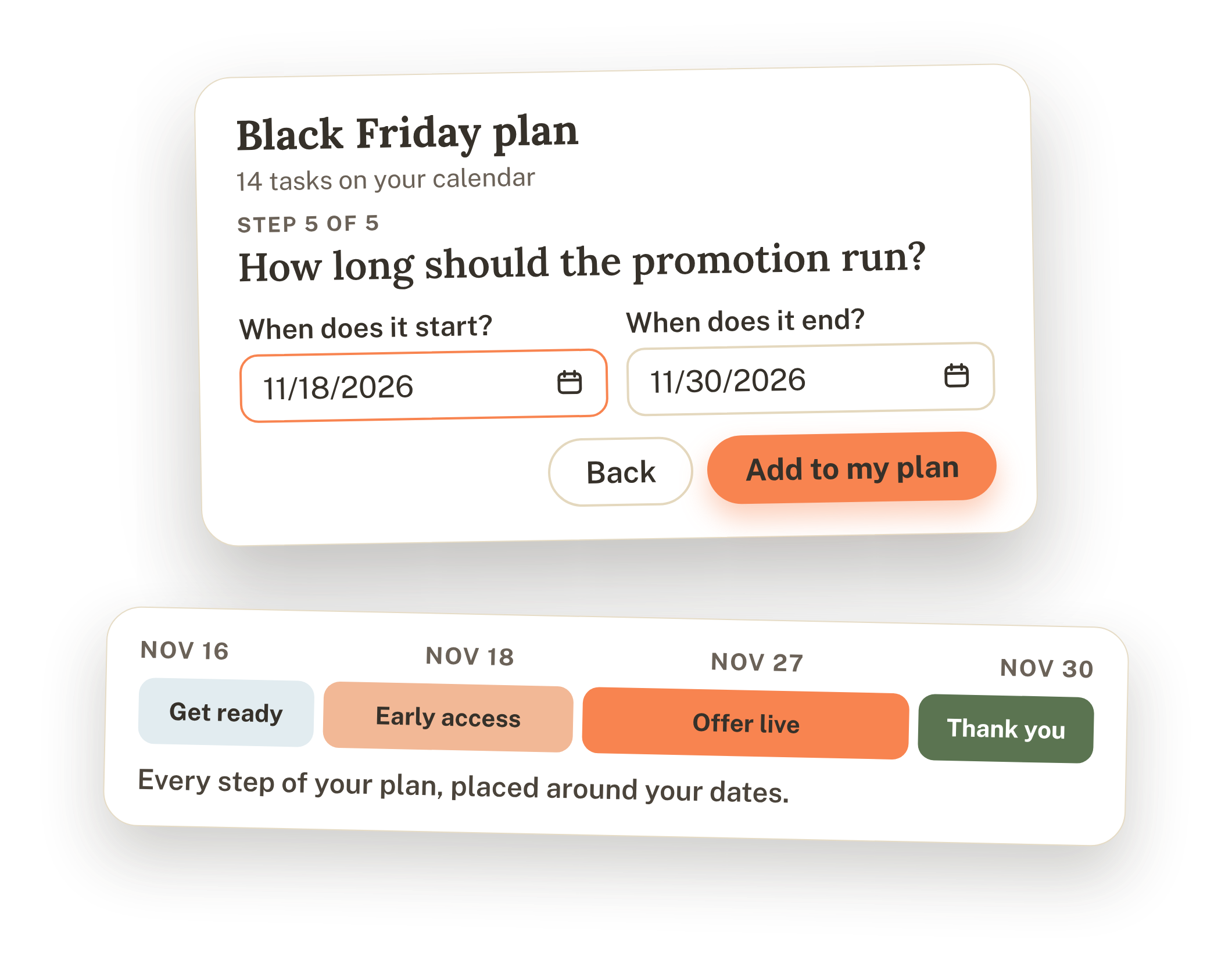
Map out your weeks, from the first teaser to the thank-you
A good Black Friday runs in four phases, and each one has a different job. Thinking in phases keeps you from sending the same sales message ten times in a row.
- Get ready. This is the quiet stretch before anything is announced. You build your sign-up page, set up your offer, prepare your website, and start warming up your audience with helpful content and hints that something is coming.
- Early access. Your email list and best customers hear the details first, which rewards the people who already chose to hear from you.
- Offer live. The public sale opens, and your posts, emails, and reminders carry the message, including a clear final-day push.
- Thank you. You close the sale with gratitude, share what happened, and begin the follow-up that turns shoppers into repeat customers.
In 2026, a simple version looks like this. Spend the first week deciding your goal, offer, and audience and getting your sign-up page ready. Spend the second week warming up your audience and growing your list. Send early access in the days leading into the weekend, run the public sale from Black Friday through Cyber Monday, and plan your thank-you for the days right after.
Doing this in Navia. You tell Navia when your promotion starts and when it ends, and she places every step of the plan around those dates, from the first teaser to the final thank-you. Each task lands on your calendar in the right order, so you can see the whole plan at a glance and watch it come together week by week.
Get your home base ready before the traffic arrives
Every post and email you send during Black Friday points people somewhere, and that somewhere needs to be ready. A beautiful campaign that sends shoppers to a confusing page wastes the attention you worked to earn.
Work through this checklist a week or two before the sale:
- A dedicated page for the offer. One clear page with the offer, the dates, the promo code, and a single button works better than sending people to a homepage and hoping they find it.
- A website that works on a phone. Most shoppers will click from social media or email on their phones, so test the page, the checkout, and the booking form yourself.
- Inventory and capacity. Confirm how much you can actually sell or how many appointments you can take, and say so honestly if spots are limited.
- Shipping or delivery dates. Customers want to know when their order arrives, especially for gifts, so share your cutoff dates early.
- Promo codes that have been tested. Try every code at checkout before you announce it.
- A plan for customer questions. Decide who answers messages and how quickly, and prepare short replies for the questions you expect, like shipping times and returns.
- A way to track results. Note where sales come from, such as email, Instagram, or a specific code, so you can learn what worked.
Some of this is a to-do for you, and some of it can be written for you. In Navia's plan, tasks like setting up your Black Friday landing page appear as to-dos on your calendar, while the posts and emails are ready for Navia to write, so you always know which tasks need your hands and which just need a click.
Build your email list while attention is high
If there is one move I would make in the weeks before Black Friday, it is growing your email list. A sale announced on social media depends on who happens to see the post that day, while an email goes straight to people who asked to hear from you. A list also stays with you long after the sale ends, which makes every new subscriber worth far more than a single order.
Give people a reason to join before the sale begins. A VIP early access list, a gift guide, a deal preview, or a subscriber-only bonus all work well, and each one can be built in a day or two. I put together a full list of ideas in the guide to Black Friday lead magnets, which pairs naturally with this plan.
You will also need an email platform to store your list, build your sign-up form, and send the emails. Flodesk and ActiveCampaign are my two favorites, and either one can handle everything in this plan.
- Flodesk is the one I recommend for beginners. The templates are clean, the drag-and-drop editor is easy to learn, and a flat monthly rate covers unlimited subscribers and emails. You can get 25% off your first year with the code THENAVIAWAY.
- ActiveCampaign is my pick when you want more automation. It can tag subscribers by interest and send different follow-ups depending on what each person clicks, which is helpful when several groups need different messages.
Whichever you choose, set up the sign-up form and the welcome email early, then test them from start to finish so the freebie arrives within a minute of signing up.
Write your content before you need it
The weeks of Black Friday are not the time to stare at a blank screen. The most helpful thing you can do for your future self is to write your emails and posts ahead of time, schedule what you can, and leave the days of the sale open for conversations and customer questions.
A strong plan usually includes content for each phase:
- A teaser or heads-up email letting people know something is coming and inviting them to join your list for early access.
- A few posts that warm up your audience, such as a gift guide, a helpful tip, or the story behind what you are offering.
- The early access email with the details, a clear deadline, and one button.
- The public announcement across your email and social channels.
- Reminder posts and a last-day email, since many shoppers decide in the final hours.
- A thank-you email and post after the sale closes.
A few writing habits make this content work harder. Lead with what the shopper gets, state the deadline plainly, and use one main call to action in each message. Write the way you speak, since friendly and specific beats loud and urgent. Share the reason behind your offer, whether that is thanking your community or celebrating a milestone, because people buy from businesses they feel connected to.
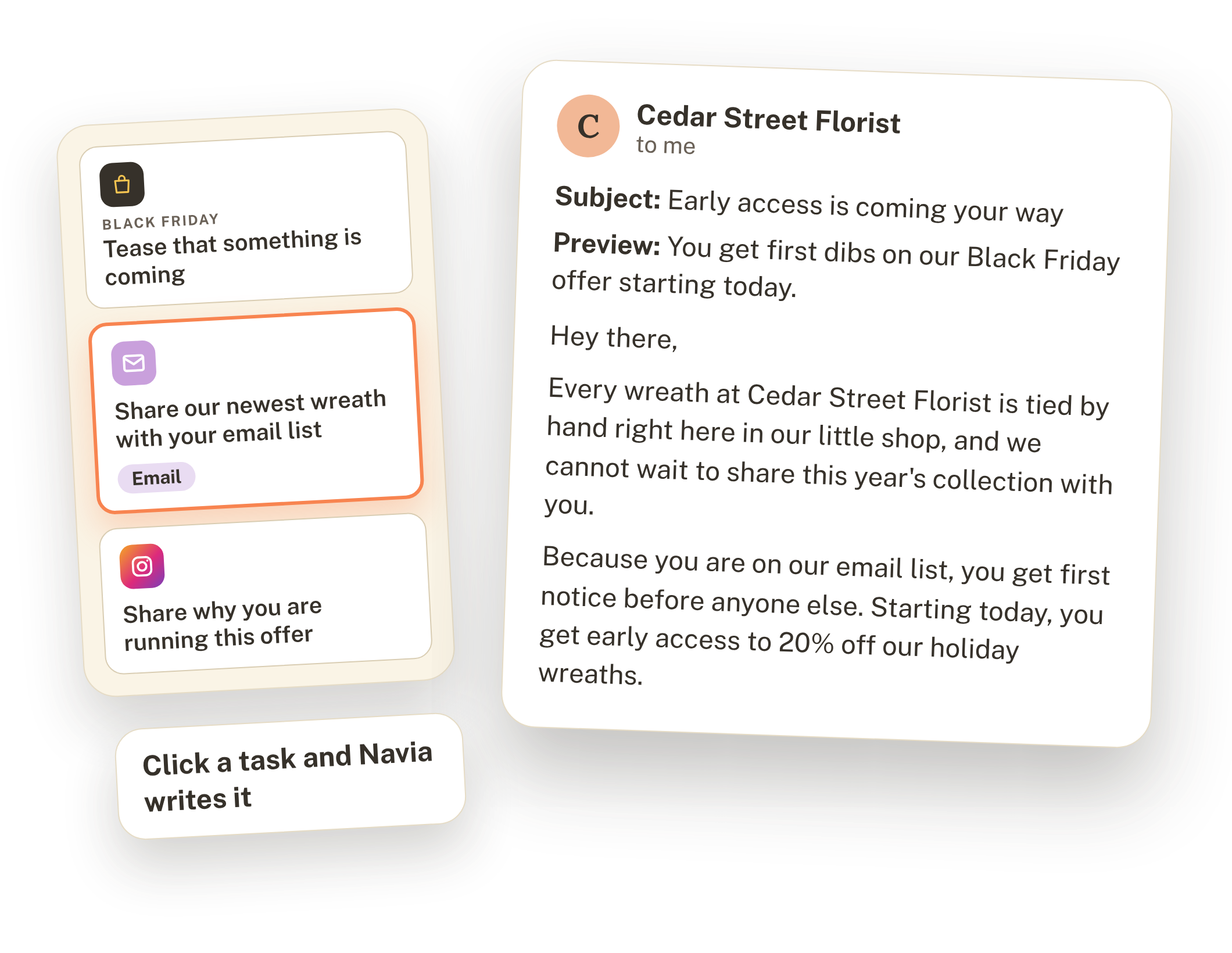
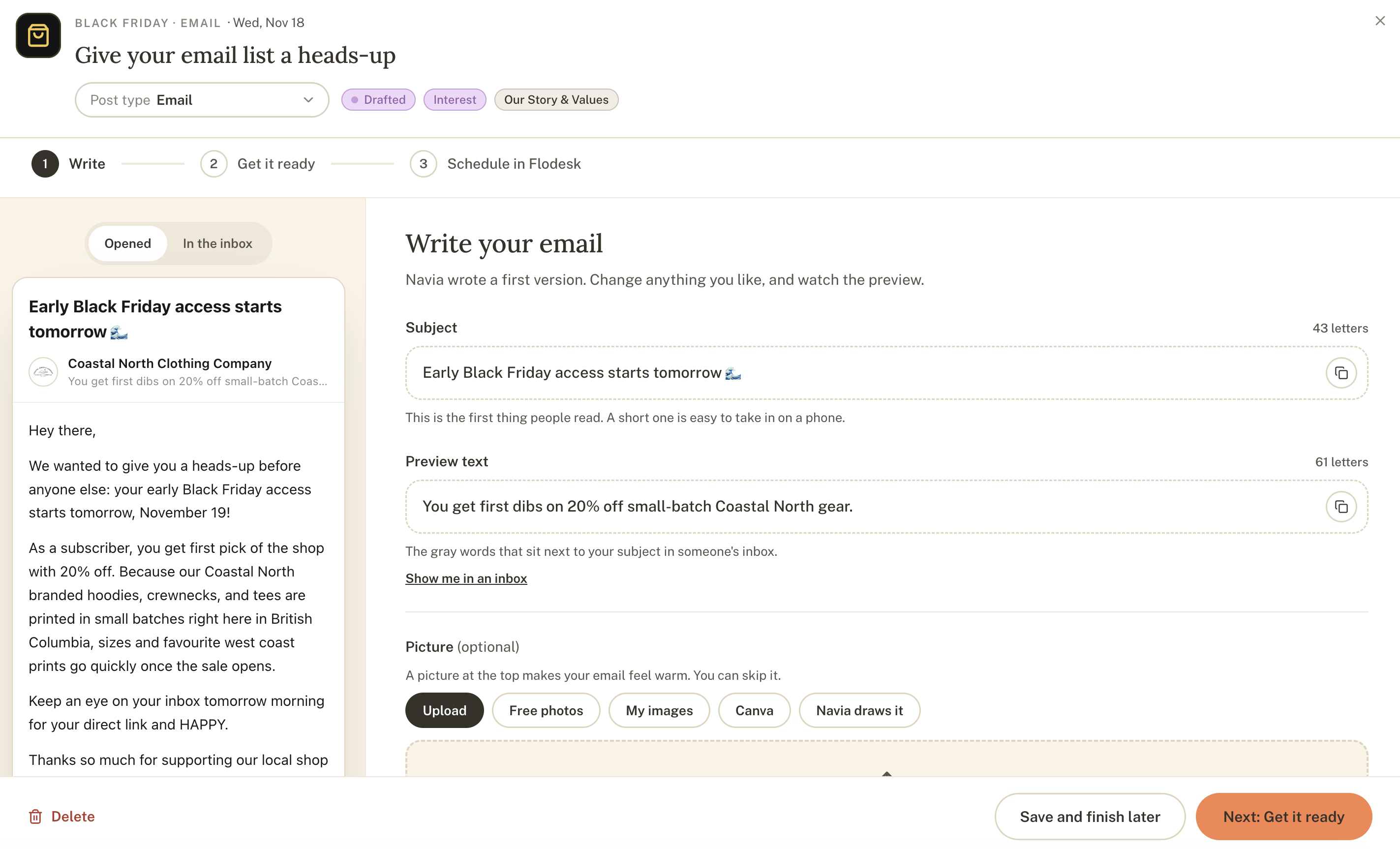
Doing this in Navia. This is my favorite part of the plan. You open any task on your calendar, click it, and Navia writes it for you in your voice. An email task, for example, opens with a subject line, a preview, and the full message, ready to read over and send. Posts work the same way, and you can click a task whenever you are ready and watch it get written.
[INSERT IMAGE 10] Carousel slide 9, "Click a task and watch it get written" (the calendar tasks next to the finished email draft). Suggested alt text: "A Black Friday email drafted by Navia from a calendar task, with the subject line, preview text, and message ready to send."
You can also work ahead. Navia writes each task and saves it, so you can come back whenever it suits you, then post it in a click. Writing a week of content in one sitting, then scheduling it, frees up the days that matter most.
What to do during Black Friday week
With the planning behind you, the week itself can be calm. Here is a simple rhythm to follow.
- The days before. Send your early access email to your list, confirm your page and your codes one more time, and share a reminder that the sale is close.
- Black Friday morning. Open the sale, send your announcement, and post on your main channels. Keep an eye on your messages, since early questions often show up fast.
- Midday. Share a customer favorite, a behind-the-scenes photo, or a quick note about what is selling. A little real-time life makes the sale feel human.
- Saturday and Sunday. Send a friendly reminder to people who have not opened or clicked yet, and answer questions promptly.
- Cyber Monday. Remind people that the final day has arrived, share what is still available, and send your last-day email in the morning with a second reminder in the evening.
One piece of advice I give often is to protect your energy. Schedule what you can, take breaks, and eat real meals. A rested owner answers questions with warmth, and shoppers notice.
What to do after the sale ends
The sale ending is where many businesses stop, and it is also where the most valuable work begins. The people who bought, and the people who joined your list along the way, are now the start of a longer relationship.
- Send a thank-you. Thank customers by email and in a post, share how the sale went, and say what is coming next.
- Welcome your new subscribers. A short sequence with a story, a helpful tip, and a gentle question keeps new readers from forgetting who you are.
- Ask for reviews. Buyers are happiest right after they receive their order, so send a friendly request with a direct link.
- Review the numbers. Check which emails, posts, and codes brought in sales, compare them to your goal, and write down what you would repeat and what you would change.
- Save your plan. Keep your offer, your emails, and your notes in one place, so next year starts from a strong draft instead of a blank page.
Those few hours of follow-up often matter more than the sale itself, because they turn a busy weekend into customers who return all year.
Planning for Black Friday when you are new or sell services
Black Friday advice tends to assume a shop full of products and a long list of customers, and plenty of wonderful businesses look different. Here is how to adapt the plan.
If you have not launched yet. You can still use this season well. Build a "be first in line" list with a founding-member perk, such as a launch-day discount or a free first session, and share what is coming so people feel part of the beginning. Early subscribers often become your first customers, and their replies tell you what to offer. Black Friday gives you a ready-made reason for people to join a list that has no sale attached yet.
If you sell services. Your offer is your time, so protect it. Consider a priority booking spot for your list, a free add-on instead of a discount, or gift certificates for the people on someone's holiday list. Be clear about how many spots exist and when they open, since honest limits build trust.
If you run an online or digital business. Early access, bonus content, or a bundle often works better than a deep discount, since your costs behave differently. Pair your offer with clear instructions for getting started, so new buyers feel supported from the first click.
If you do not want to discount at all. Choose a different way to join the season, such as a gift guide, a limited edition, a thank-you gift, or a donation to a cause you care about for every order. Shoppers respond to generosity and clarity as much as to a lower price.
How to plan your Black Friday with Navia, step by step
Everything above comes together inside Navia in a few minutes. Here is the full walkthrough, from adding the plan to posting your first task. Each step takes only a moment, and you can come back and adjust anything later.
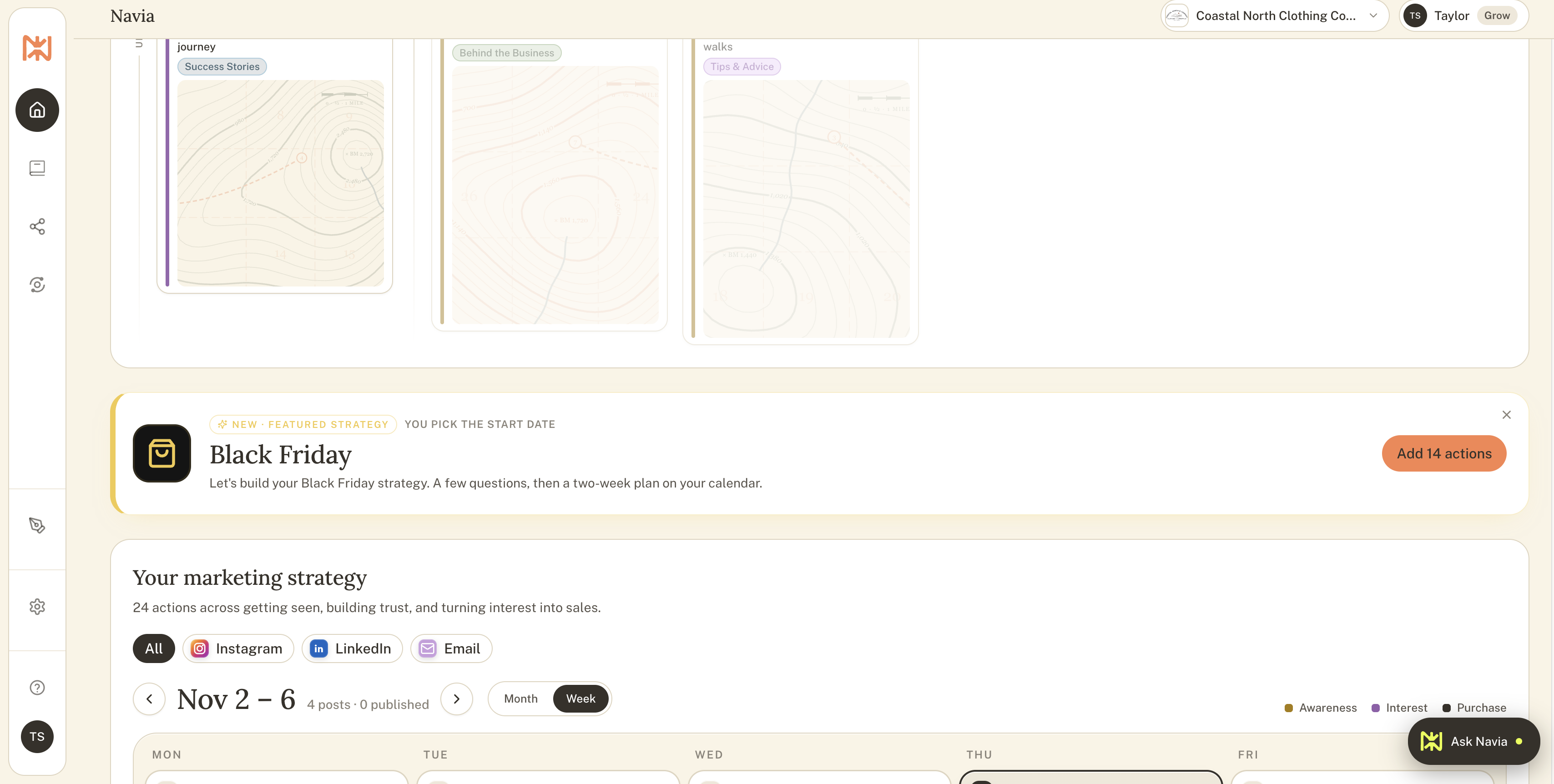
To get started, login to your Navia account.
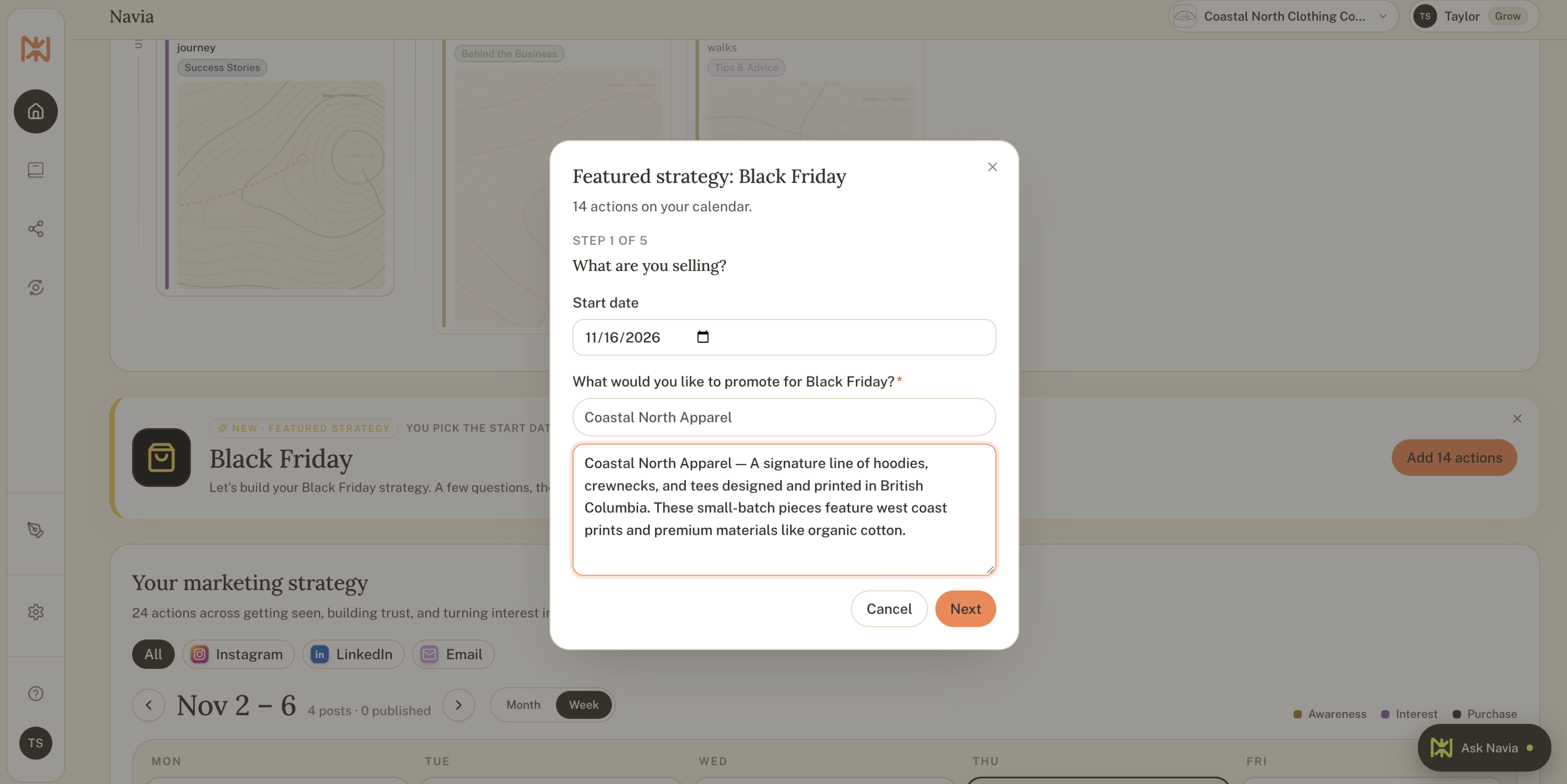
Step 1: Add the Black Friday plan
You'll need a Build or Grow plan to access the Black Friday planning tools. Click "Add 14 actions" to get started building your custom plan.
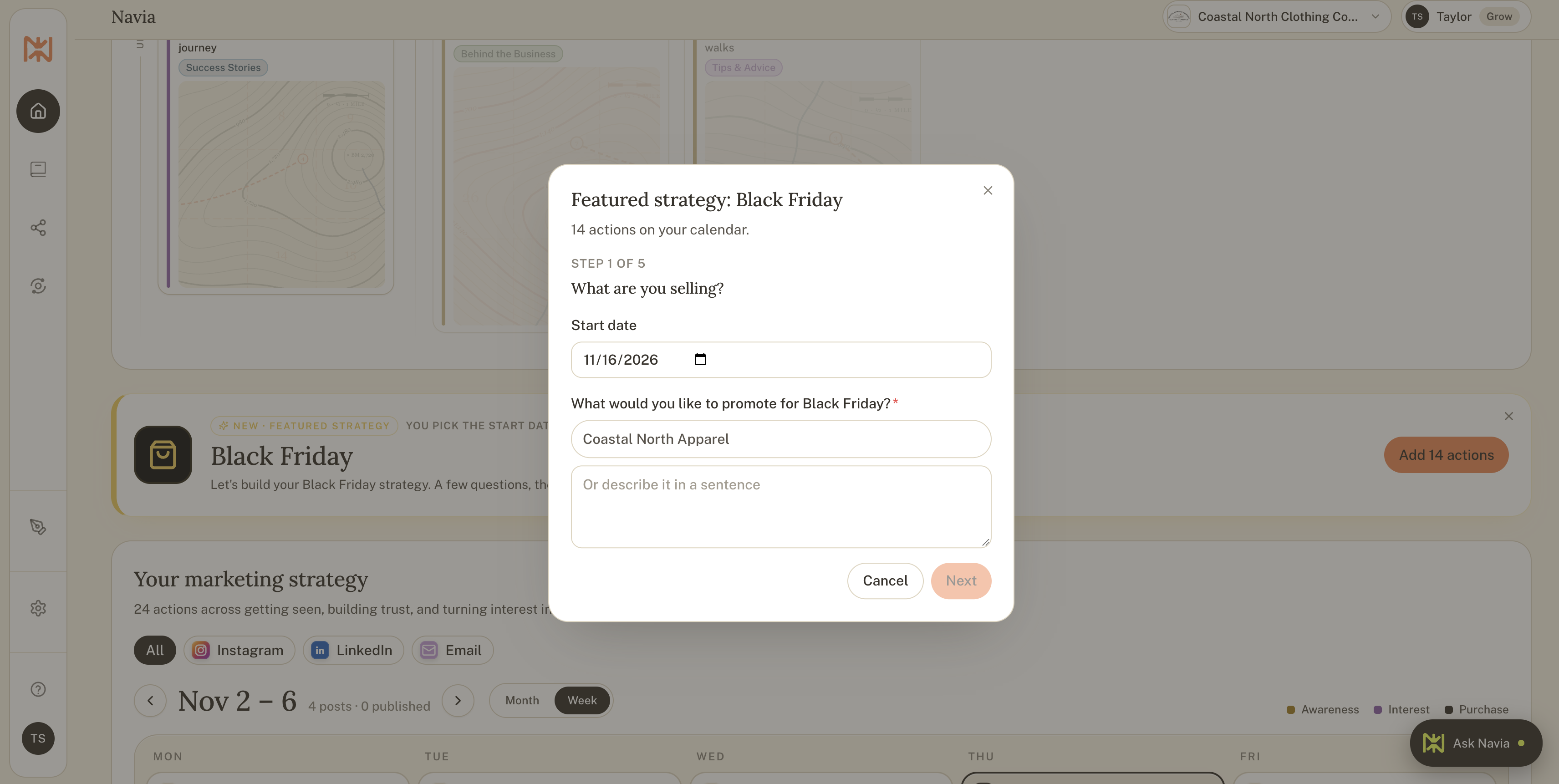
Step 2: Pick your start date and what to promote
Choose the date the plan starts, then select the offers you want to feature. Your products and services come from your Brand Book, so if you don't see what you want to promote, add it from your Brand Book and come back to this menu.
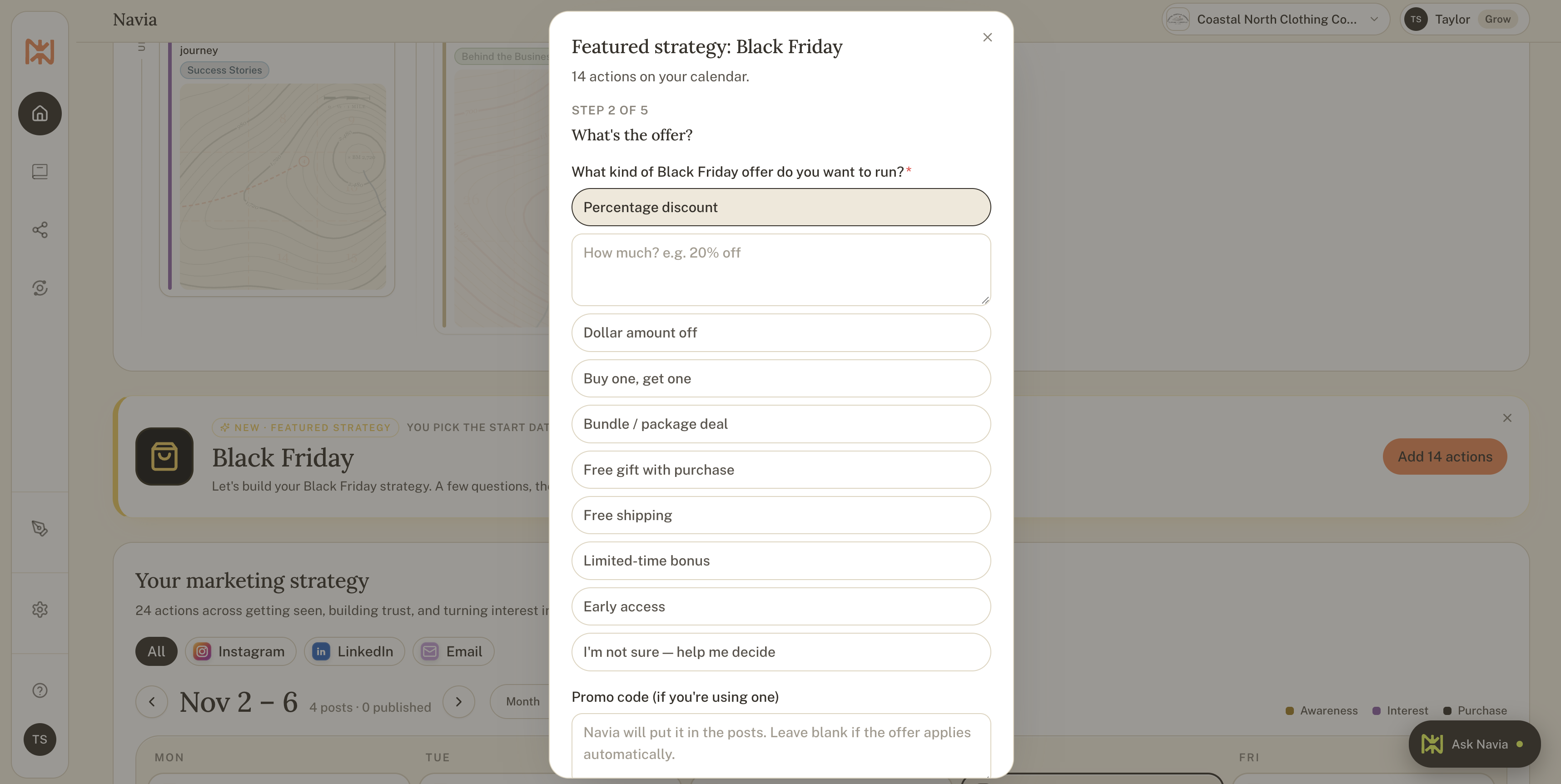
Step 3: Describe your offer and add the details
Choose the kind of offer you are running by clicking on one of the options that appears. Navia adds an offer description, but modify it however you need if you want to change something.
If you want to promote something that isn't featured here, you can add another offer to your Brand Book, then come back to this menu and it will appear in the dropdown.
Step 4: Pick what kind of Black Friday promotion you want to run.
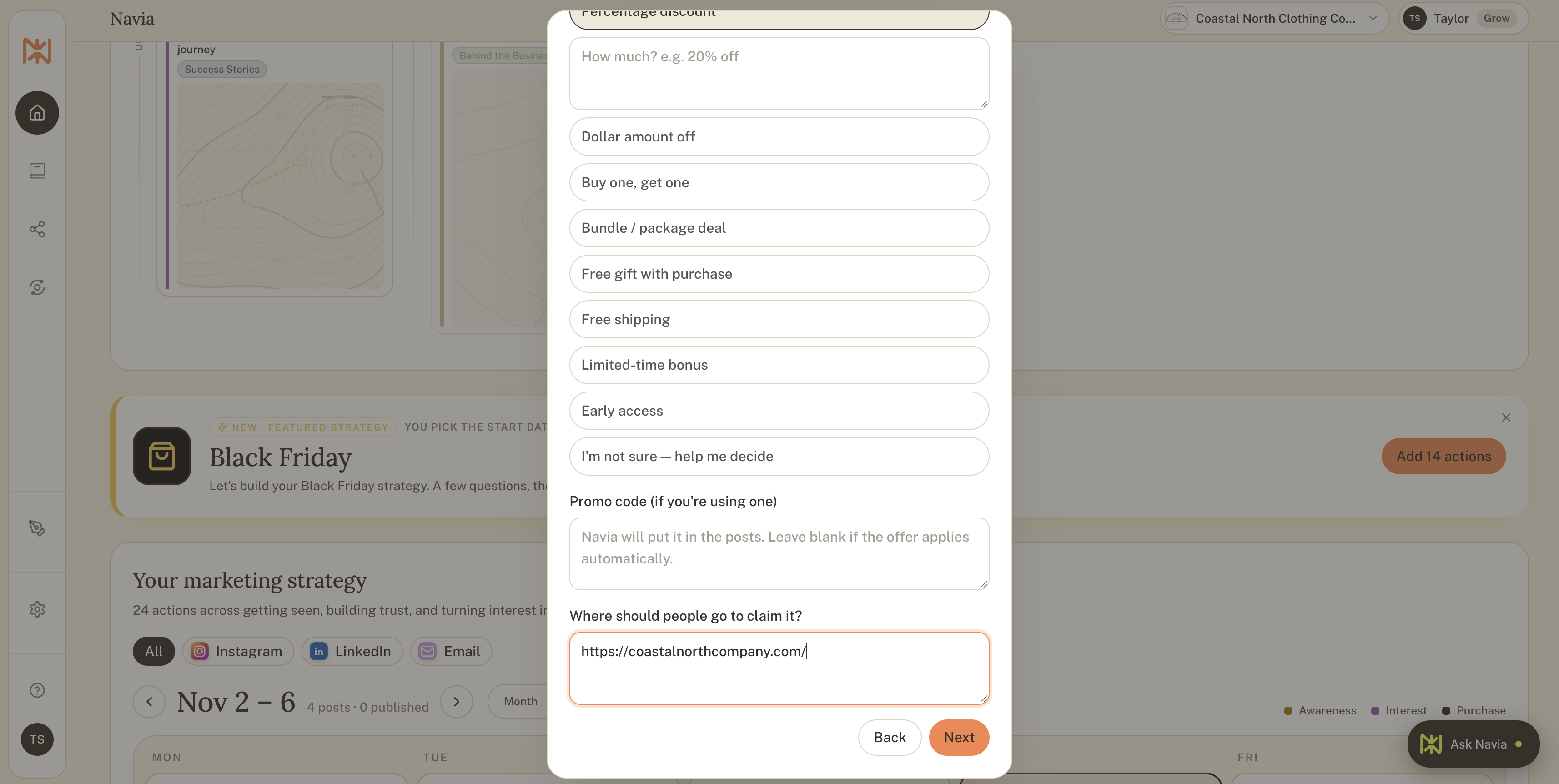
Choose what kind of promotion you want to offer to your customers, from a percentage dicount to a limited-time bonus. Navia will prompt you with the information needed depending on which option you choose.
If there is a specific landing page, Instagram profile, or more where people need to go to redeem the offer, you can add it in the bottom field.
Step 5: Choose your goal for your promotion.
Select the goal that resonates the most with what you're hoping to achieve. If more than one apply, select the one that feels most true.
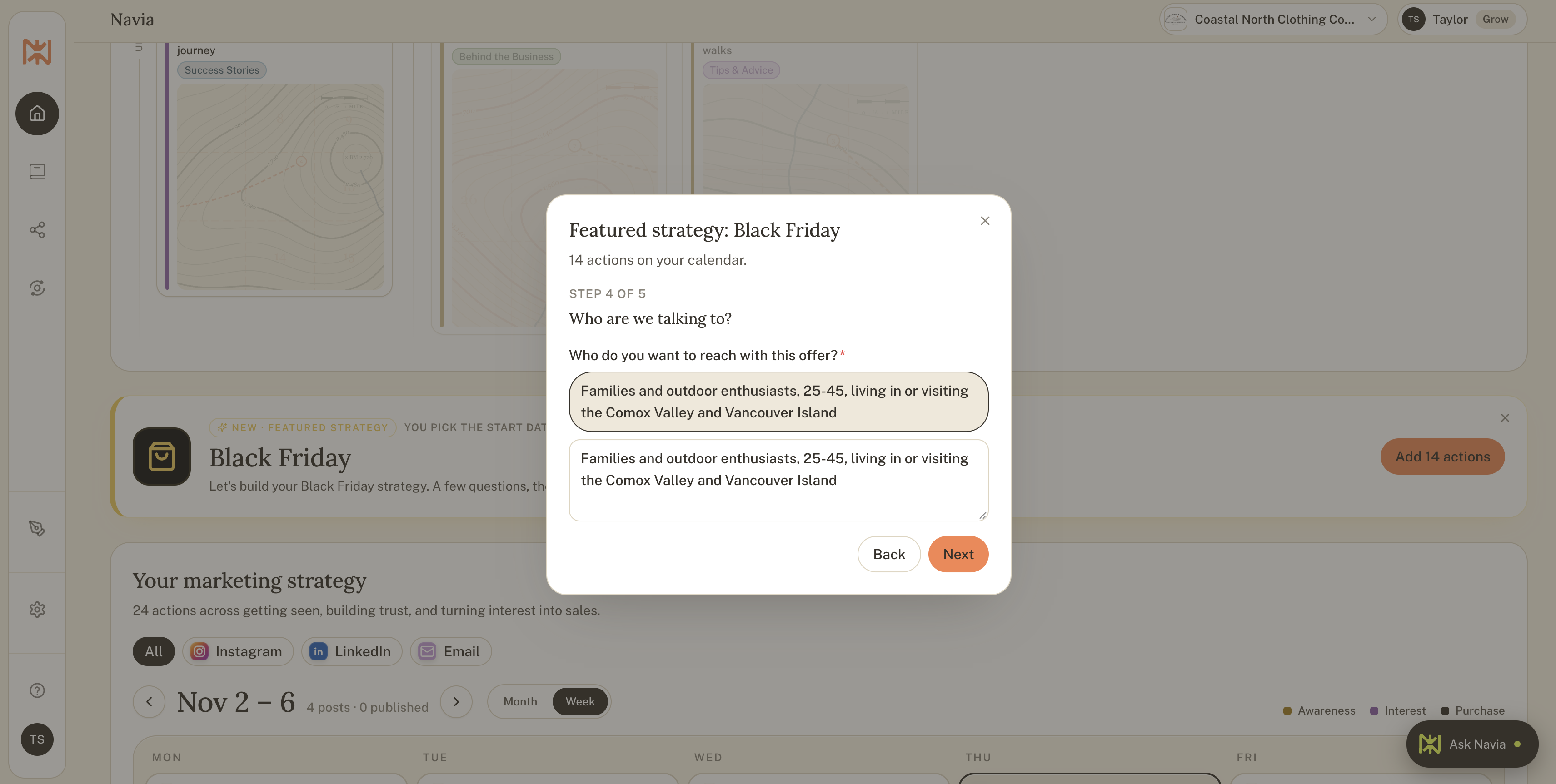
Step 6: Select the audience you want to target for your audience.
If you want to target an audience that isn't featured here, you can add another offer to your Brand Book, then come back to this menu and it will appear in the dropdown.
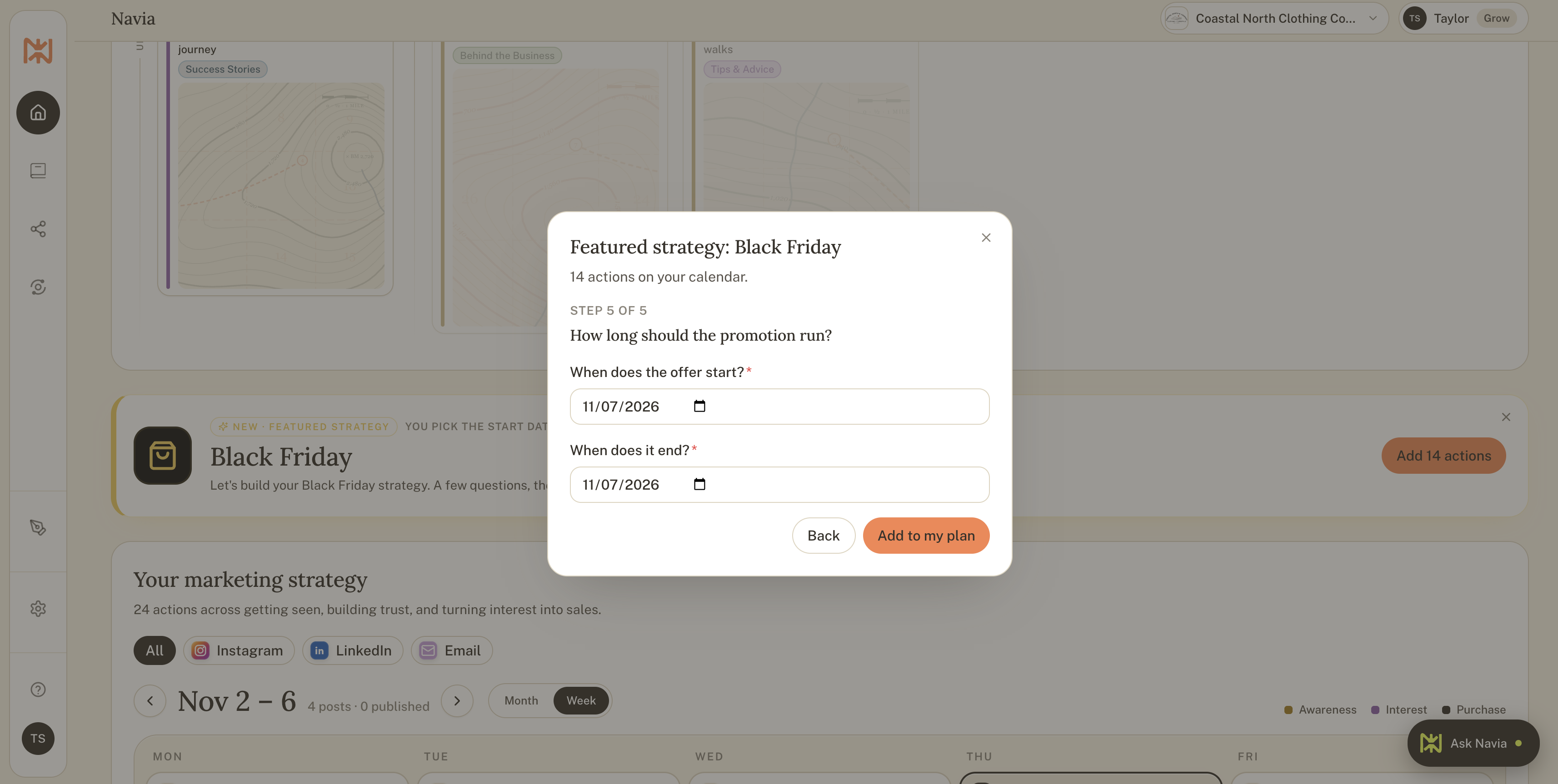
Step 6: Confirm the end date of your promotion.
Choose when the promotion ends.
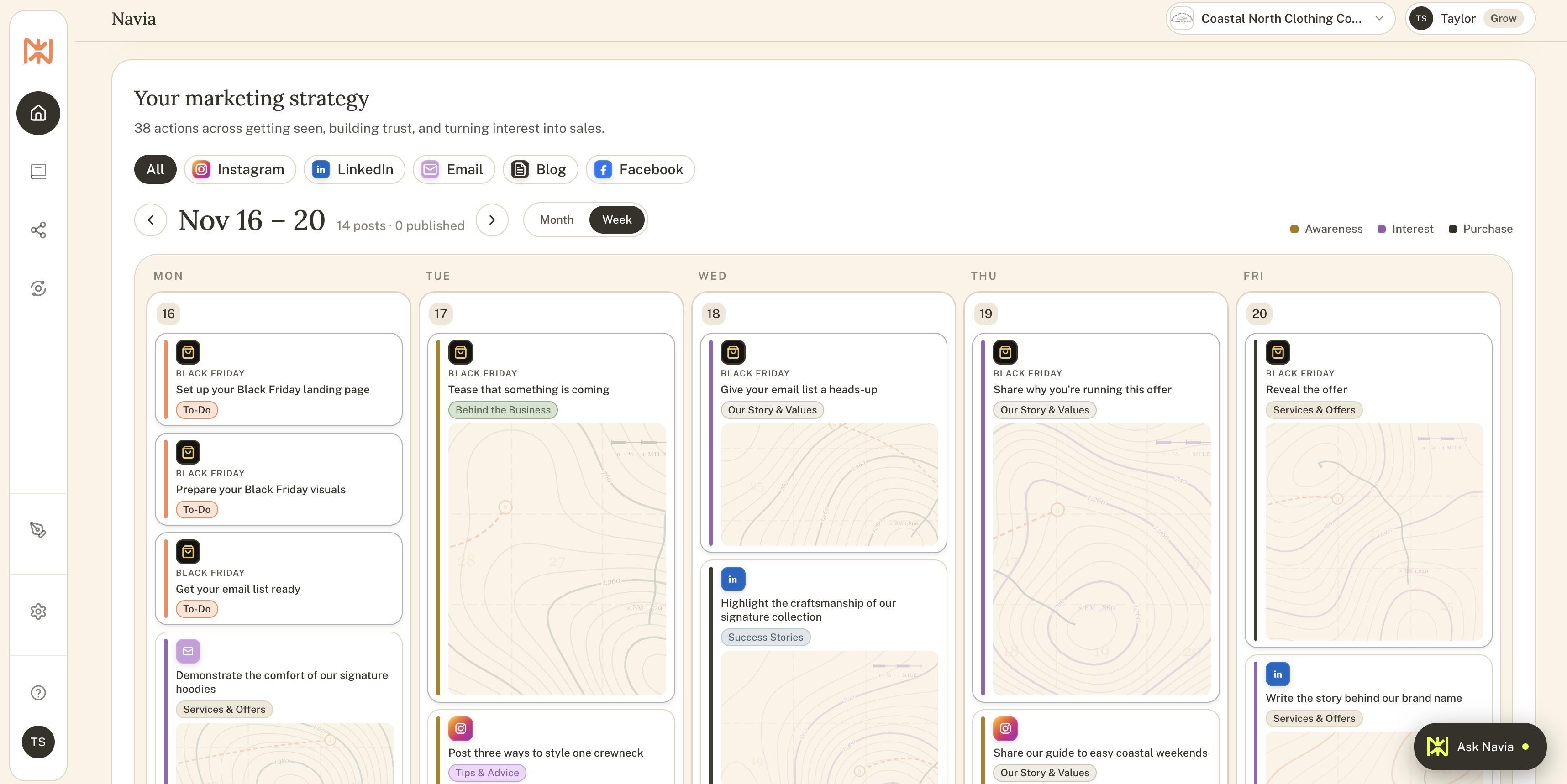
Step 7: See your plan on the calendar
Every task is placed around your dates, with posts, emails, and to-dos each in the right spot.
Step 8: Click a task and let Navia write it
Open any task, and Navia writes it for you in your voice, ready to read over, edit, and use.
Step 9: Post when you are ready
Written tasks are saved, so you can work ahead and post each one in a click when the timing suits you.
Mistakes that can quietly cost businesses sales
A few patterns show up year after year, and each one is easy to avoid once you know about it.
Discounting without doing the math. A sale that brings in plenty of orders and very little profit is a hard lesson. Work out your earnings per sale before you announce the price.
Starting too late. Announcing on the morning of the sale means missing the weeks when interest is building. Three weeks of preparation changes the entire weekend.
Running too many offers. A wall of choices makes shoppers pause and leave. One clear offer, or a small set, is easier to say yes to.
Sending shoppers to a confusing page. If people have to hunt for the offer, many will give up. Give them a single page with one button.
Forgetting to test. Promo codes, links, and checkout forms need a trial run before the sale begins.
Overpromising. Shipping dates, limited spots, and deadlines should be real, since trust is the most valuable thing a small business owns.
Skipping the follow-up. Buyers and new subscribers need a thank-you and a welcome, or they drift away as quickly as they arrived.
Doing it all in the same week. Writing, designing, and posting during the sale itself leaves no energy for customers. Work ahead whenever you can.
Frequently asked questions about planning for Black Friday
When should I start planning for Black Friday?
Three to four weeks before is ideal, since it leaves room to build your list, prepare your page, and warm up your audience. Starting later still helps, and the plan simply gets shorter.
What is the best Black Friday offer for a small business?
The best offer is the one that fits your margins and your goal. A modest discount, a bundle, a free gift, or early access all work well, and many businesses do best when they offer something special without cutting prices deeply.
Do I have to discount to take part in Black Friday?
Offering a discount is optional. A gift guide, a limited edition, a bonus, or a priority booking spot can bring in customers while your prices stay the same.
How many emails should I send during Black Friday?
Most businesses do well with a heads-up, an early access email, the public announcement, and a last-day reminder, with a short reminder in between. Keep each email focused on one idea and one button.
How do I plan Black Friday if I am a service business?
Focus on limited spots, early access to booking, gift certificates, or a free add-on. Be clear about dates and availability so clients know exactly what to do.
What if I do not have an email list yet?
Start one now with a simple sign-up page and a reason to join, such as early access or a gift guide. Even a small list gives your sale a warm audience, and the subscribers stay with you after the weekend.
How does Navia help me plan Black Friday?
Navia asks a few questions about your offer, goal, audience, and dates, then places a two-week plan of 14 tasks on your calendar. She writes the posts and emails in your voice, so you can read them over and post when you are ready. The Black Friday plan is included when you upgrade.
What should I do after Black Friday?
Send a thank-you, welcome your new subscribers, ask buyers for reviews, and review your results. Save everything you learned, so next year starts from a plan instead of a blank page.
You have more time than you think
If Black Friday has felt like something that happens to you, I hope this guide shows that it can be something you shape.
Start with one decision today. Write down your goal as a number with a date, and the rest of the plan will follow one step at a time.
If you would like Navia to build the plan with you, she is ready when you are. She asks a few questions, places every task on your calendar, and writes your posts and emails in your voice, so you always know what to do next. Get started with Navia for free and see how it feels to plan your busiest season without the stress.